 Protovision
Agents and prompts
In short: an AI agent (Claude Code, Claude Desktop, Cursor, any MCP client) reaches your traces through one link, your MCP link. The trace never leaves your machine: the agent's questions come to the program that holds it, and only the answers go back. Each call costs 0.25 credit; reading the docs is free; a new account has 200 credits.
Connect
Two ways, for two kinds of work. Both use the same account and the same link.
The window
- 1Agent, top right of the window: type your e-mail and press E-mail me a link. No password.
- 2Open the link on any device (it works 24 hours): the window signs itself in and keeps the sign-in.
- 3Add to Claude Code in the pane runs claude mcp add for you. For another client, Copy the MCP link and add it as a remote (HTTP) MCP server.
- 4In a terminal, type claude, and ask with the word protovision. The pane shows what the agent does and what it costs.
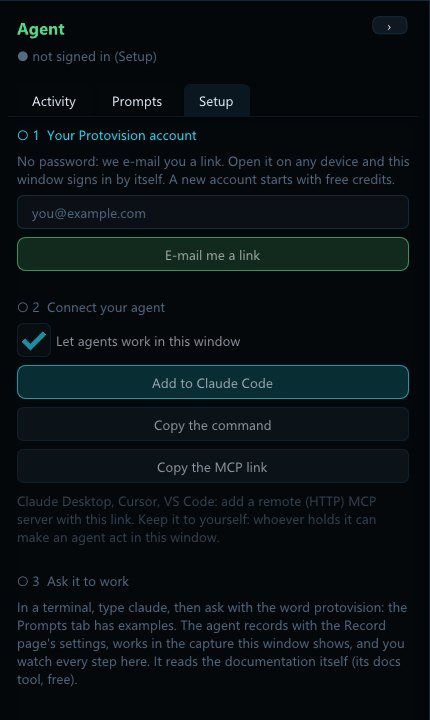
Let agents work in this window, in the pane, switches them off at any time; Sign out deletes the saved sign-in. The window's agent has window, settings, record, stop, open_capture, debug, python and api.
Serve a trace
Your account page gives your account token and your MCP link. Serve each trace with the token set; any number at once, all behind the same link. Keep the terminal open: closing it takes the trace offline.
$env:PROTOVISION_TOKEN = "<your account token>"
.\ProtoInsight.exe serve app.proto.bundle      # the analysis tools
.\ProtoTTD.exe serve app.proto.cap # the debugger (one debug tool)The agent lists them with list_projects and opens one with open_project. In Claude Code, the suggested launch (thinking off, effort low: the work is many short calls, not long thought):
claude mcp add --transport http protovision <your MCP link>
claude --settings '{"alwaysThinkingEnabled":false,"effortLevel":"low"}'Prompts
An MCP server cannot start anything: the agent waits to be asked. Say protovision so it picks the right tools. Replace what is between < >.
The same prompts are in the window, in the agent pane's Prompts tab: click one to copy it, paste it into Claude Code, change what is between < >.
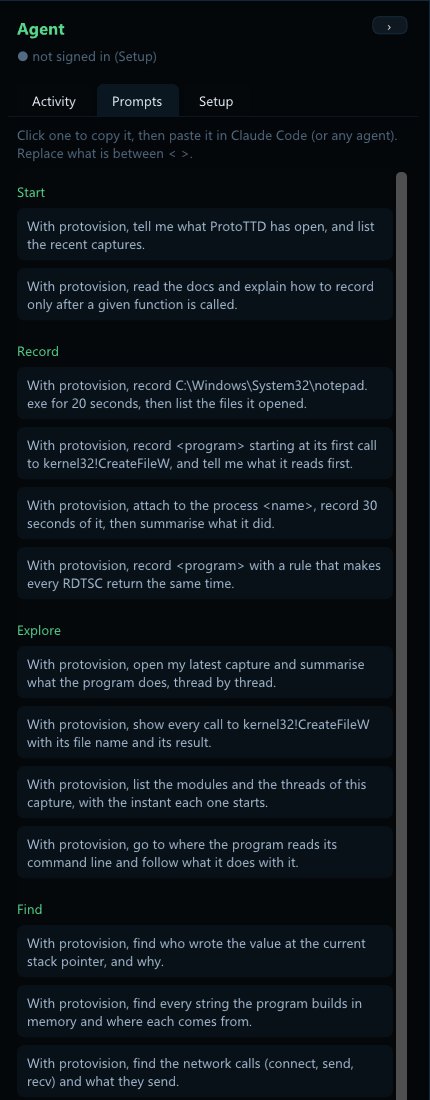
Start
With protovision, tell me what ProtoTTD has open, and list the recent captures.
With protovision, read the docs and explain how to record only after a given function is called.
Record
With protovision, record C:\Windows\System32\notepad.exe for 20 seconds, then list the files it opened.
With protovision, record <program> starting at its first call to kernel32!CreateFileW, and tell me what it reads first.
With protovision, attach to the process <name>, record 30 seconds of it, then summarise what it did.
With protovision, record <program> with a rule that makes every RDTSC return the same time.
Explore
With protovision, open my latest capture and summarise what the program does, thread by thread.
With protovision, show every call to kernel32!CreateFileW with its file name and its result.
With protovision, list the modules and the threads of this capture, with the instant each one starts.
With protovision, go to where the program reads its command line and follow what it does with it.
Find
With protovision, find who wrote the value at the current stack pointer, and why.
With protovision, find every string the program builds in memory and where each comes from.
With protovision, find the network calls (connect, send, recv) and what they send.
Debug
With protovision, put a breakpoint on kernel32!CreateFileW, run to it, and go back to the instruction that built its file name.
With protovision, from here, go back to where rax got its value and explain the computation.
With protovision, run backward to the previous call of this function and compare its arguments with this one.
With protovision, mark the instants where the main thread waits, and tell me on what.
Scripts
With protovision, write and run a Python script that counts the syscalls of the main thread.
With protovision, write a script that marks every call to VirtualAlloc and the size it asks for.
A whole analysis
For a served bundle, when you want the program understood and written up: the agent raises your question, splits it, and keeps agents working until every part is answered.
Start on this trace with MCP protovision, and keep going. Your question: <write it here, or leave this line: "what does this program do?"> Raise it as a root question (several roots are allowed: one per thing asked), then use a workflow so this outlasts you. If the workflow-authoring skill or a Workflow tool is available, you MUST use it: one agent per due question (session({op:"question"}).due), each with the question brief, relaunched on due as each returns, until every root is answered and no question is open. Only without a workflow tool, drive the same loop with subagents; only without subagents, work the due questions yourself, deepest first. Never stop because the tree grows: every question raised is work the answer needs. If the structure is locked, tell the user and answer at instruction level. Then summarise what you found and left unknown.
How a long analysis is organised
A tree of questions, not a list of functions. The server keeps the tree and checks every answer.
Your question is the root (a session can hold several). A root is cut into themes, the stages of the run, and a theme into subjects, each about a few objects of the trace. An agent answers a question by reading the trace and closes it with two paragraphs: one a person can read, one with the instants and addresses that prove it. The work ends when each root has its answer and no question is open.
| Word | Means |
|---|---|
due | What is ready to be worked, deepest first: the queue every agent reads. |
budget | A root raises at most 15 themes, a theme 10 subjects, a subject none: the tree cannot grow without end. |
minimum work | A question closes only after the agent wrote a note or a name, made a comparison and was shown the code it rests on; a refusal says what is missing. |
closing | Answered, waiting on its children, or undecidable with proof that the trace cannot show it. |
Run it with a workflow
One agent tends to stop as soon as the work looks done, long before it is proven. Write the loop instead: in Claude Code, say use a workflow, one agent per due question:
- raise the root question, in your words;
- read the due list and start one agent per due question, each with its own name;
- as each returns, read due again and start what it lists;
- stop only when the session is done, not when a pass finds nothing due: a claim held by an agent that ended lapses after ten minutes.
agent argument: what an agent read, wrote and compared is then its own, and its notes are signed with it. Follow it all live in the live view.Models
The work is many short calls against an index. A frontier model (Claude Sonnet class) wrote the Aegis / Themida report in an hour and a half with about 4,000 calls; a small model is enough for the many short reads of a fleet, with a stronger one kept for the questions that stall. Any MCP client that can run several agents does the same job.
The report
The answer to the root question, written along the run, with the instant that proves each claim.
- export the closed answers and cut them by stretch of the run (start-up, a licence check, the main loop);
- one writer per stretch, in parallel: what happens in order, a table of proofs, what is observed and what is only a hypothesis;
- an assembler: a summary, a chronological map, each protection and what it does on failure, a verdict, the limits;
- a checker: every instant and question number is looked up in the answers; what is not supported goes, or is marked as a hypothesis.
A branch the run never took is written not observed, never guessed. The four steps are packaged as one skill for Claude Code: sorting the answers, numbered stages, the mechanism in pseudo-code checked by a simulator against the recorded values, and a review before delivery. It is the method behind our published reports.
mkdir -p ~/.claude/skills/protovision-report
mv SKILL.md ~/.claude/skills/protovision-report/SKILL.mdThen, once the analysis is closed: write the report. The skill is one text file: read it before you install it.